Best AI Mobile App Builders: Export & Publishing
Table of Contents
- The short answer
- What to compare
- Code export and publishing compared
- Native features and integrations compared
- Best builder by product type
- Prototype: Adalo or Thunkable
- Consumer native app: FlutterFlow
- Internal app: Adalo, Bravo Studio, or Natively
- Code-owning startup: Draftbit or Rork
- Four concrete selection examples
- Test the code export before launch
- App store publishing: what stays your job
- Bottom line
- The short answer
- What to compare
- Code export and publishing compared
- Native features and integrations compared
- Best builder by product type
- Prototype: Adalo or Thunkable
- Consumer native app: FlutterFlow
- Internal app: Adalo, Bravo Studio, or Natively
- Code-owning startup: Draftbit or Rork
- Four concrete selection examples
- Test the code export before launch
- App store publishing: what stays your job
- Bottom line
The short answer
Choose based on what you need to own:
- FlutterFlow: best all-around option for visual Flutter development, native features, and exportable code.
- Draftbit: best for portable React Native and TypeScript with low-cost export.
- Rork: best for prompt-first Expo or SwiftUI generation.
- Adalo or Thunkable: best for fast managed prototypes when source ownership is not required.
- Bravo Studio: best for Figma-led apps backed by REST APIs.
- Natively: use only when intentionally wrapping an existing responsive web app.
For a code-owning startup, shortlist FlutterFlow, Draftbit, and Rork. Adalo, Thunkable, Bravo Studio, and Natively can simplify publishing, but leaving them may require rebuilding the client.
What to compare
A TestFlight app proves neither source portability nor independent buildability. Apply these checks to every candidate:
| Requirement | What to verify | Why it matters |
|---|---|---|
| Runtime | Flutter, React Native, Swift/Kotlin, or WebView | A store binary may still be a wrapped website |
| Code ownership | Downloadable project, license, assets, and dependencies | Owning a binary is not owning its source |
| Independent build | The project builds without the vendor | This is the practical lock-in test |
| Store workflow | Who handles builds, signing, uploads, metadata, and review | “One-click” rarely covers the full submission |
| Native features | Push, purchases, deep links, background modes, and permissions | Browser previews cannot validate every device API |
| Extension model | Packages, native modules, custom components, or APIs only | Determines whether unusual requirements are feasible |
| Backend boundary | Hosted data, REST APIs, Supabase, Firebase, or vendor-only services | Portable frontend code does not make data portable |
| Plan gate | Minimum plan for export, builds, notifications, and live apps | Prototype pricing may hide production costs |
Reject a platform if it cannot produce a signed test build, establish ownership, or document an exit path.
Code export and publishing compared
The following facts come from current vendor documentation and pricing. A dash means the reviewed official material did not clearly establish the capability.
| Builder | Mobile output | Source export and ownership | Store submission | Minimum documented gate |
|---|---|---|---|---|
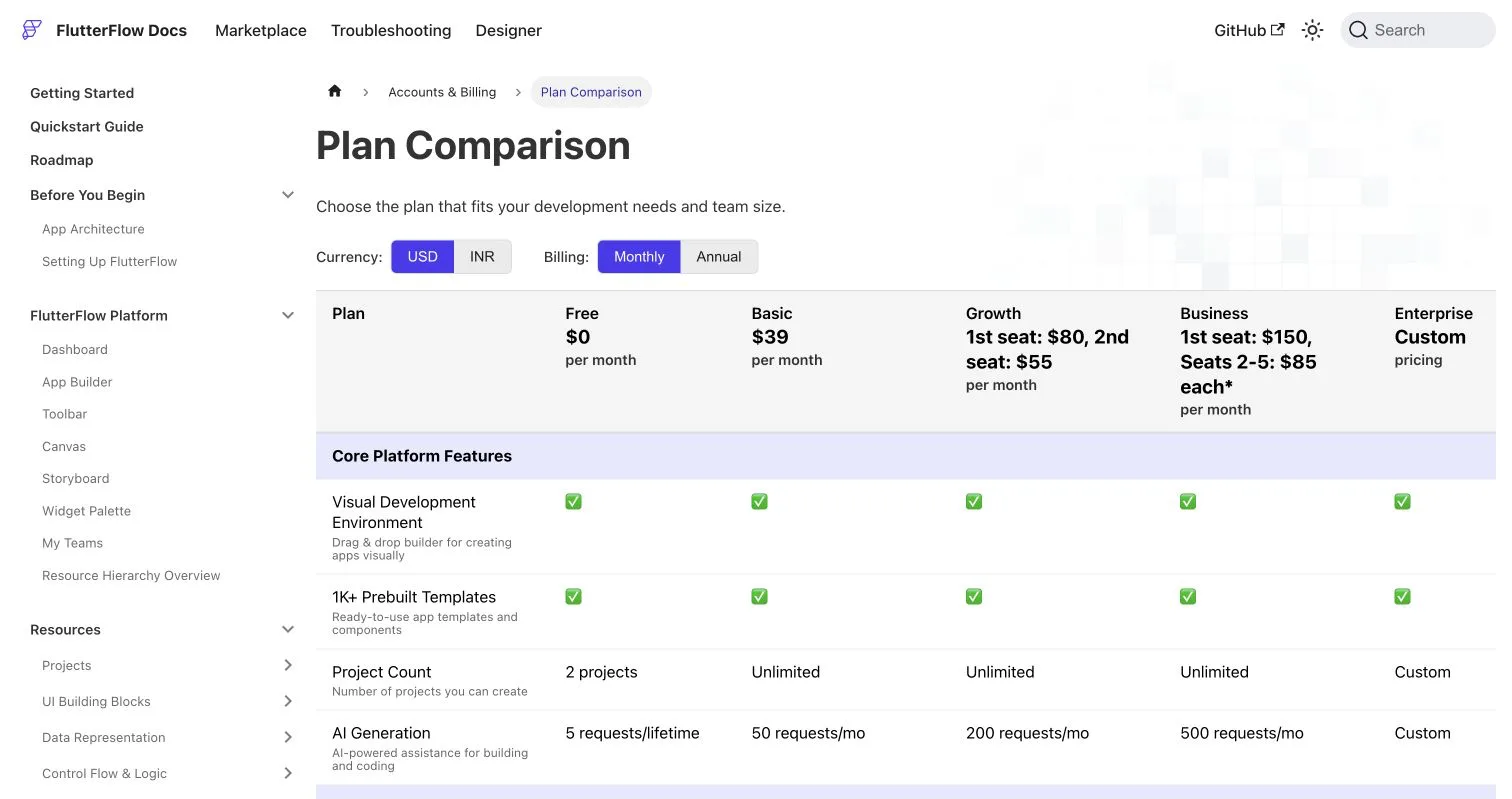
| FlutterFlow | Flutter for iOS and Android | Full Flutter project download on paid plans; GitHub workflows provide external control | Direct Apple and Google deployment, or self-managed exported builds | Basic includes code download and one-click deployment; advanced GitHub syncing requires higher tiers (plan comparison) |
| Draftbit | React Native with TypeScript | Standard exports a ZIP; Pro adds GitHub; generated code belongs to the customer | One-click publishing or manual local submission | Standard $12/month; Pro $24/month (pricing, ownership FAQ) |
| Rork | Pro uses React Native/Expo; Max produces SwiftUI | Paid users own generated code through two-way GitHub sync | Built-in iOS submission; Android AAB for manual upload | Export requires a paid plan, listed from $25/month (FAQ, subscriptions) |
| Adalo | Managed iOS, Android, and web/PWA output | No standard source export; data can be moved separately | Managed IPA/AAB builds and guided publishing | Starter $36/month billed annually for one published app (pricing, publishing docs) |
| Thunkable | One project for iOS, Android, and web | No documented source-project export; binaries are downloadable | Guided Apple and Google publishing | Builder $59/month monthly or $37/month annually for one live app (pricing) |
| Bravo Studio | Vendor-generated Swift/Kotlin binaries | No source export; customers own content and license the runtime code | Generates IPA/AAB files | Solo $22/month for unlimited store builds; some features cost extra (pricing, FAQ) |
| Natively | WebView wrapper for an existing web app | No independent source export documented; customers receive binaries | IPA, APK, AAB, and automatic iOS upload | Essential $19/month monthly or $12/month annually (pricing, architecture FAQ) |
Pricing is a snapshot. Confirm checkout pricing and test export before committing; an export button does not guarantee a maintainable project.
Native features and integrations compared
| Builder | Local builds | Push | Purchases | Custom capability | Backend options |
|---|---|---|---|---|---|
| FlutterFlow | Yes, from exported code | Built-in Firebase workflow | RevenueCat | Dart, Flutter packages, configuration files, or post-export work | Firebase, Supabase, APIs, custom services |
| Draftbit | Yes, from exported Expo code | Documented for iOS and Android | Packages or exported code; no verified first-class workflow | TypeScript, packages, Expo configuration, native modules after export | REST APIs and Supabase |
| Rork | Yes after GitHub export | Built in for Pro and Max | RevenueCat | Full post-export changes; Max supports Apple-specific APIs | Supabase, Firebase, APIs, serverless functions |
| Adalo | No independent source build | Professional and above | Supported; verify plan and component | Marketplace/custom components only | Hosted Postgres, external collections, REST actions |
| Thunkable | Vendor-generated downloads | OneSignal on supported plans | RevenueCat blocks on supported plans | JavaScript Web Bridge | Built-in data and web APIs |
| Bravo Studio | No source-based local build | OneSignal | RevenueCat paid add-on | No arbitrary native code | REST APIs, including Xano and Bubble |
| Natively | No source-based local build | OneSignal | RevenueCat | JavaScript SDK and supported plugins | The wrapped web app’s backend |
FlutterFlow documents Local Run, RevenueCat integration, and third-party Flutter packages. Draftbit documents managed and manual builds for native testing tracks (publishing overview).
Closed platforms may require a continuing subscription. Thunkable says published apps on current Builder and Advanced plans become unavailable without a qualifying subscription. Bravo may show a blocked message after a downgrade to Free, while Adalo says published-app actions fail after downgrading to Free.
Best builder by product type
Prototype: Adalo or Thunkable
Choose Adalo for database-driven prototypes with hosted data, authentication, and visual workflows. Choose Thunkable for block-based logic or sensor-heavy projects.
Before building:
- Accept that there is no source export.
- Test push and purchases in store test tracks.
- Budget for an active production subscription.
These trade-offs suit disposable validation builds better than products expected to hire mobile engineers.
Consumer native app: FlutterFlow
FlutterFlow is the default recommendation for consumer apps needing polished UI, purchases, push, deep links, and an engineering handoff.
- Put business logic in backend services where practical.
- Sync exported code to a company-controlled repository early.
- Add automated builds before public release.
- Test permissions, offline states, and purchases on physical devices.
Internal app: Adalo, Bravo Studio, or Natively
Adalo can suit small hosted workflows. Bravo fits Figma-designed interfaces over REST APIs. Natively is defensible when the app intentionally wraps a mature responsive web product.
Avoid wrappers for complex offline behavior, background processing, high-performance gestures, or extensive device APIs.
Code-owning startup: Draftbit or Rork
Choose Draftbit for TypeScript, React Native, visual control, and conventional local development. Choose Rork for faster prompt-led generation in Expo or SwiftUI.
Rork Max is iOS-only. Use Rork Pro if Android is required.
Four concrete selection examples
These are editorial recommendations, not vendor case studies.
| Product | Start with | Reason | Exit trigger |
|---|---|---|---|
| Subscription habit tracker | FlutterFlow | Flutter export, RevenueCat, push, and store deployment | Generated-code merges slow development |
| AI meal-planning MVP | Rork Pro | Prompt-first React Native generation and hosted backend options | Custom observability or native packages become necessary |
| Field inspection tool for 30 employees | Adalo | Hosted data and managed deployment reduce operational work | Offline sync or device management becomes central |
| Figma membership app over Xano | Bravo Studio | Design fidelity and REST binding fit the architecture | The roadmap requires an unsupported native SDK |
Illustrative calculation: three people on an $80-per-seat plan cost $240 per month, excluding backend, monitoring, Apple, and Google fees. This is arithmetic, not a quoted ownership cost.
Test the code export before launch
Before gaining paying users:
- Export or sync into a company-owned Git repository.
- Build iOS and Android from a clean machine or CI runner.
- Record framework, SDK, package, and build-tool versions.
- Keep secrets and privileged AI calls in server-side functions.
- Confirm that authentication, data, media, and analytics can be exported separately.
- Document signing keys, identifiers, store accounts, and renewal dates.
- Ship one update through TestFlight and Google Play internal testing without undocumented vendor help.
FlutterFlow recommends keeping custom work on a separate branch and merging generated updates deliberately (GitHub workflow). For Draftbit or Rork, inspect Expo configuration and native dependencies before treating an export as production-ready.
For closed platforms, the exit plan is portable data, documented APIs, replaceable backend services, and a rebuild budget. Their binaries cannot be converted into clean source projects.
App store publishing: what stays your job
No builder can guarantee store approval. You remain responsible for privacy, metadata, reviewer access, purchases, SDK behavior, and policy compliance.
| Item | Action |
|---|---|
| Developer accounts | Enroll through the company where practical |
| Review access | Provide a working demo account and live backend |
| Digital purchases | Configure store products and explain non-obvious flows |
| Privacy | Audit every analytics, advertising, AI, and notification SDK |
| Google testing | Check whether the account faces closed-testing requirements |
| Release evidence | Retain screenshots, permission explanations, tests, and version notes |
Apple charges $99 per membership year (Apple Developer Program). Google charges a $25 one-time registration fee for full distribution (Android Developer Console).
Google requires personal developer accounts created after November 13, 2023, to run a closed test with at least 12 opted-in testers for 14 continuous days before applying for production access (Google testing requirements). Apple expects complete metadata, working backends, reviewer access, accurate privacy information, and functioning purchases (App Review Guidelines).
Bottom line
Choose FlutterFlow for the strongest overall mix of visual development, native features, store deployment, local builds, and exportable code. Choose Draftbit for React Native and TypeScript, or test Rork when prompt-first generation matters most.
Choose Adalo, Thunkable, or Bravo Studio only after accepting source lock-in. Choose Natively only for an intentional WebView architecture.
Before committing, build one production feature, verify the export on physical devices, and complete a test-store submission.