How to Deploy a Lovable App: Hosting Guide
Table of Contents
- How to deploy a Lovable app: the short answer
- Choose your Lovable app hosting path
- Path 1: deploy with native Lovable app hosting
- Lovable hosting pricing after build
- Path 2: export Lovable app to GitHub
- Path 3: use external Lovable app hosting
- Pre-deployment security and configuration checks
- Troubleshooting a failed Lovable app deployment
- Compact Lovable launch checklist
- Bottom line
- How to deploy a Lovable app: the short answer
- Choose your Lovable app hosting path
- Path 1: deploy with native Lovable app hosting
- Lovable hosting pricing after build
- Path 2: export Lovable app to GitHub
- Path 3: use external Lovable app hosting
- Pre-deployment security and configuration checks
- Troubleshooting a failed Lovable app deployment
- Compact Lovable launch checklist
- Bottom line
How to deploy a Lovable app: the short answer
TL;DR: For most MVPs, click Publish, launch on the generated lovable.app address, and connect a custom domain when ready. Lovable handles the build, SSL certificate, delivery network, and publishing workflow.
Export to GitHub and use Vercel, Netlify, or Cloudflare when you need pull requests, preview deployments, CI checks, or host-specific controls. Self-host the Vite project’s dist directory only when compliance, private networking, or existing infrastructure justifies the additional operational work.
Before launch, verify environment variables, Supabase Row Level Security (RLS), authentication URLs, client-side routing, server functions, DNS, analytics, and rollback.
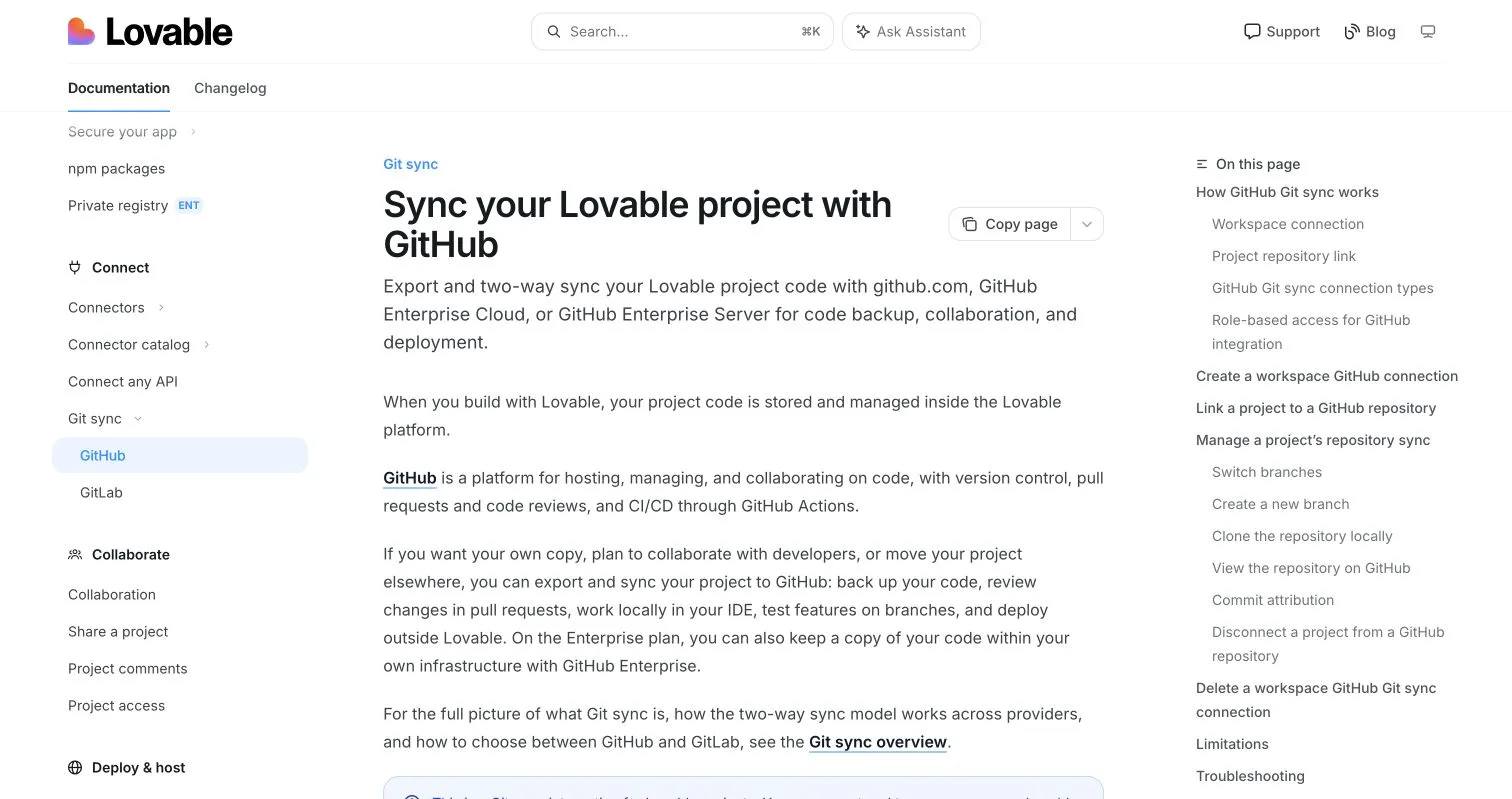
Official source captured in Chrome on July 25, 2026. Open the image link for the current page.
Choose your Lovable app hosting path
Lovable projects are standard Vite and React applications, according to Lovable’s deployment and ownership documentation. The app can run outside Lovable; the editor and AI agent cannot be self-hosted.
| Path | Choose it when | Main tradeoff |
|---|---|---|
| Lovable native publishing | You are launching an MVP, landing page, internal tool, or small SaaS product | Lowest operational burden; production remains tied to Lovable’s hosting workflow |
| GitHub plus Vercel, Netlify, or Cloudflare | You need pull requests, previews, CI, local development, or host-specific controls | More control with moderate setup |
| Your infrastructure | You need compliance controls, private networking, containers, or an established internal platform | Maximum control and operational responsibility |
Editorial recommendation: Start with native publishing. Move through GitHub only when another workflow or host provides a concrete benefit. Self-host only when infrastructure requirements outweigh the cost of owning builds, TLS, delivery, monitoring, patches, uptime, and rollback.
Path 1: deploy with native Lovable app hosting
Lovable’s publishing guide says each published project receives a permanent lovable.app URL. Shared previews are temporary.
- Open the project and select Publish.
- Choose or generate an address.
- Configure plan-supported public or workspace access.
- Set the title, description, icon, and social image.
- Run Lovable’s security check and resolve important findings.
- Publish and test the URL in a private browser window.
- After editing, select Publish → Update; edits do not automatically reach production.
Paid plans support custom domains, but plan packaging can change. Confirm domain support and access controls on the current Lovable pricing page.
Follow Lovable’s custom-domain instructions and copy the supplied DNS values exactly.
| DNS check | Required action |
|---|---|
A and TXT records |
Use the exact values Lovable provides |
AAAA record |
Remove it if it conflicts with Lovable routing |
Apex and www |
Add each hostname separately when both are needed |
| Verification | Wait for DNS and certificate issuance; propagation can take up to 72 hours |
Do not switch marketing links or authentication settings until the domain shows Live and HTTPS works.
Lovable hosting pricing after build
Lovable hosting has no reliable single post-build price. Current pricing information says Cloud hosting is available across plans, smaller apps often fit within included grants, and larger apps can consume credits based on traffic and resources.
Paid subscriptions include credit balances and grants under current terms. Credits may also fund building and AI features, while custom domains require a paid plan according to the publishing documentation. Treat exact allowances as check current plan items.
Use this budget formula:
monthly deployment cost = frontend hosting + backend usage + observability + domain + engineering time
Illustrative calculation, not a Lovable quote: Two hours of external-host maintenance at an internal rate of $75 per hour costs $150 per month before hosting, database, logs, or monitoring. Free hosting does not make deployment costless; for early products, engineering time may be the largest hidden expense.
Path 2: export Lovable app to GitHub
Use Lovable’s GitHub connector for source control, external deployment, local development, or collaboration. It creates a new repository with two-way synchronization on the default branch, usually main; Lovable cannot start from an arbitrary existing repository.
- Open Settings → Connectors → GitHub and select Connect project.
- Authorize the Lovable GitHub app for the intended account or organization.
- Select the repository owner and confirm the transfer.
- Wait for synchronization.
- Clone the repository and run
npm cifollowed bynpm run build. - Connect the repository to your host.
- Use feature branches and merge tested changes into
main.
Do not rename, move, transfer, or delete the connected repository; changing its recorded name, owner, organization, or location breaks synchronization. Disconnecting preserves the repository and history, but reconnecting creates a new repository.
| Host | Build settings | Routing requirement |
|---|---|---|
| Vercel | npm run build; output dist |
Follow the Vite deployment guide and add an SPA rewrite if deep links fail |
| Netlify | npm run build; publish dist |
Follow the Vite guide and add /* /index.html 200 for history routes |
| Cloudflare Pages | npm run build; output dist |
Follow its build configuration; a project without a top-level 404.html is treated as an SPA |
Test a nested URL such as /account/settings by loading it directly, not only by navigating from the home page.
Path 3: use external Lovable app hosting
For containers, VMs, Kubernetes, or internal platforms, follow Lovable’s external hosting requirements. Use npm run build, serve dist, and use Node.js 22 for the build environment as Lovable recommends.
- Clone a tagged or known commit.
- Install locked dependencies with
npm ci. - Inject required build-time variables.
- Run
npm run build. - Serve
distthrough a static host, CDN, Nginx, or Apache. - Return
/index.htmlfor unknown application routes. - Add TLS, health checks, logs, monitoring, and a documented rollback command.
Lovable projects commonly use React Router with BrowserRouter. Without an SPA fallback, / may work while /dashboard returns 404. For Nginx, use behavior equivalent to try_files $uri $uri/ /index.html.
The frontend and backend can move separately. An externally hosted frontend may still depend on Lovable Cloud or managed Supabase.
Editorial recommendation: Do not call a static frontend export a complete migration. A backend migration must account for schema, data, authentication, storage, functions, secrets, backups, monitoring, and connection changes.
Pre-deployment security and configuration checks
A successful build confirms bundling, not production safety or functionality.
| Check | Required action |
|---|---|
| Environment variables | Inventory every frontend and function variable; use separate preview and production values |
| Browser-exposed values | Treat every VITE_ value as public because Vite embeds it in the bundle |
| Supabase keys | Expose only the project URL and publishable key; keep secret and service-role keys server-side |
| RLS | Enable it on every exposed table; test anonymous, normal-user, cross-user, and admin access |
| Authentication | Set the production Site URL and exact callback paths |
| CORS | Handle OPTIONS requests and return the correct headers |
| Server functions | Deploy every function with production secrets, identity checks, logs, and useful errors |
| DNS and TLS | Test apex, www, redirects, certificates, IPv4, and IPv6 |
| Observability | Confirm production analytics, error reporting, and function logs |
| Rollback | Record the last known-good frontend version and database compatibility |
Lovable’s security guidance says frontend code is inspectable and secrets belong in server-side storage. Supabase permits a browser publishable key only with properly configured RLS; review its RLS guide and test with multiple accounts.
Update Supabase’s production Site URL and exact paths using its redirect URL configuration. Preview wildcards can support Vercel or Netlify, but Supabase recommends exact production paths. For browser-invoked Edge Functions, follow the CORS guide.
Troubleshooting a failed Lovable app deployment
Start with build logs, the browser console, network responses, and Edge Function logs.
| Symptom | First action |
|---|---|
| Build fails | Run npm ci && npm run build with the production Node version |
| Nested URL returns 404 | Rewrite unmatched routes to /index.html |
| Successful build shows a blank page | Inspect the first browser error or failed request; check base paths and VITE_ variables |
| Login returns to localhost | Correct the Supabase Site URL and redirect allowlist |
| Browser reports CORS failure | Inspect the OPTIONS request and function response headers |
| Users can access another user’s rows | Disable the workflow until RLS policies are corrected and tested |
| GitHub changes do not appear in Lovable | Merge the branch into main or use Lovable’s branch switching |
| Lovable cannot access the repository | Restore its original name, owner, and location |
| Domain remains unverified | Compare DNS values exactly and check for a conflicting AAAA record |
| Function fails only in production | Check deployment status, production secrets, and function logs |
Lovable’s troubleshooting documentation recommends checking logs, secrets, environment variables, and browser errors, then reverting to a stable version when appropriate.
Vercel’s production rollback limits depend on plan, as described in its rollback documentation. Netlify can publish an earlier atomic deployment through deploy management, while Cloudflare Pages supports previous production builds through Pages rollbacks.
A frontend rollback does not reverse database migrations or repair data. Prefer backward-compatible migrations, maintain backups, and plan schema recovery separately.
Compact Lovable launch checklist
-
npm ciand the production build pass. - Core flows work on a preview URL.
- No privileged credential appears in Git or the browser bundle.
- RLS tests pass for anonymous users and multiple authenticated accounts.
- Sign-up, OAuth, confirmation, reset, logout, and expiry work.
- Production functions, secrets, CORS, authentication checks, and logs work.
- Direct loads and refreshes work on nested routes.
- Apex,
www, redirects, DNS, and HTTPS are correct. - Analytics and error reporting receive production data.
- A rollback owner and last known-good release are recorded.
Lovable provides project analytics for published apps, including visitors, page views, visit duration, bounce rate, sources, devices, and pages. For external deployments, decide whether to retain those signals or add independent analytics and error monitoring.
Bottom line
Publish natively for the fastest MVP launch. Export through GitHub when pull requests, previews, CI, local development, or another host’s controls justify the setup. Self-host only when compliance or infrastructure requirements justify owning operations.
Deployment is complete when users can safely finish the key workflow, production failures are visible, and the team can reverse a bad release—not when the home page first appears.
Frequently asked questions
What is the easiest way to deploy a Lovable app?
Select Publish and deploy to the generated lovable.app address. This is usually the best MVP option because Lovable manages the build, HTTPS, delivery, and publishing workflow.
When should I deploy through GitHub instead of Lovable?
Use GitHub when you need pull requests, previews, CI checks, local development, or host-specific controls. Connect the repository to Vercel, Netlify, Cloudflare Pages, or your infrastructure.
Why does my app work on the home page but return a 404 on nested routes?
The host probably lacks an SPA fallback. Configure unmatched routes such as /dashboard to serve /index.html, then test direct loads and refreshes.
Which environment variables are safe to include in a Lovable frontend?
Treat every VITE_ variable as public. A Supabase project URL and publishable key can be used with tested RLS, but service-role keys and other privileged secrets must remain server-side.
What should I update when connecting a production domain?
Configure the host’s exact DNS records, check for conflicting AAAA records, and add apex and www separately when required. After HTTPS works, update Supabase’s Site URL and authentication callback paths.
Does exporting the frontend mean the entire Lovable app has been migrated?
No. The Vite application may still depend on Lovable Cloud, Supabase, Edge Functions, storage, authentication, and server-side secrets. A complete migration must also cover data, backups, monitoring, and connections.
What should I verify before considering the deployment production-ready?
Test the build, authentication lifecycle, RLS, functions, CORS, nested routes, DNS, HTTPS, analytics, and logs. Record a known-good release and rollback procedure; reverting the frontend will not undo database changes.