
Transactional Email for Vibe-Coded Apps: Picks & Setup
Table of Contents
- The short answer
- Why Supabase auth emails fail in AI-built apps
- Resend vs Postmark vs Amazon SES vs SendGrid pricing
- Which transactional email provider fits your app
- How to set up Supabase custom SMTP
- SPF, DKIM and DMARC for app email in plain terms
- Keep transactional and marketing email apart
- Replies and inbound email need a receiving setup
- Pre-launch transactional email checklist
- Bottom line
- The short answer
- Why Supabase auth emails fail in AI-built apps
- Resend vs Postmark vs Amazon SES vs SendGrid pricing
- Which transactional email provider fits your app
- How to set up Supabase custom SMTP
- SPF, DKIM and DMARC for app email in plain terms
- Keep transactional and marketing email apart
- Replies and inbound email need a receiving setup
- Pre-launch transactional email checklist
- Bottom line
The short answer
Your AI-built app needs a real transactional email provider before launch if it uses Supabase Auth. The built-in Supabase sender only delivers to your own team. It also allows just 2 emails per hour.
For transactional email in most vibe-coded apps, the choice is simple. Resend is the fastest Supabase custom SMTP setup. Postmark is the pick when login emails must land fast. Amazon SES is the cheapest at high volume, if someone on the team knows AWS.
| If your app… | Start with… |
|---|---|
| Runs on Lovable Cloud and sends only auth and app emails | Lovable’s built-in custom emails (paid plans) |
| Uses its own Supabase project and sends fewer than 3,000 emails a month | Resend’s free plan through custom SMTP |
| Depends on magic links and password resets arriving quickly | Postmark |
| Sends 100,000+ emails a month and already runs on AWS | Amazon SES |
| Already pays Twilio or wants API and marketing email from one vendor | SendGrid |
Prices and limits come from vendor pages checked in October 2026. Check the linked page before you commit.
Why Supabase auth emails fail in AI-built apps
AI builders generate sign-up, magic link and password reset flows in minutes. Delivery is left to you.
Supabase’s custom SMTP guide lists the limits of its default sender:
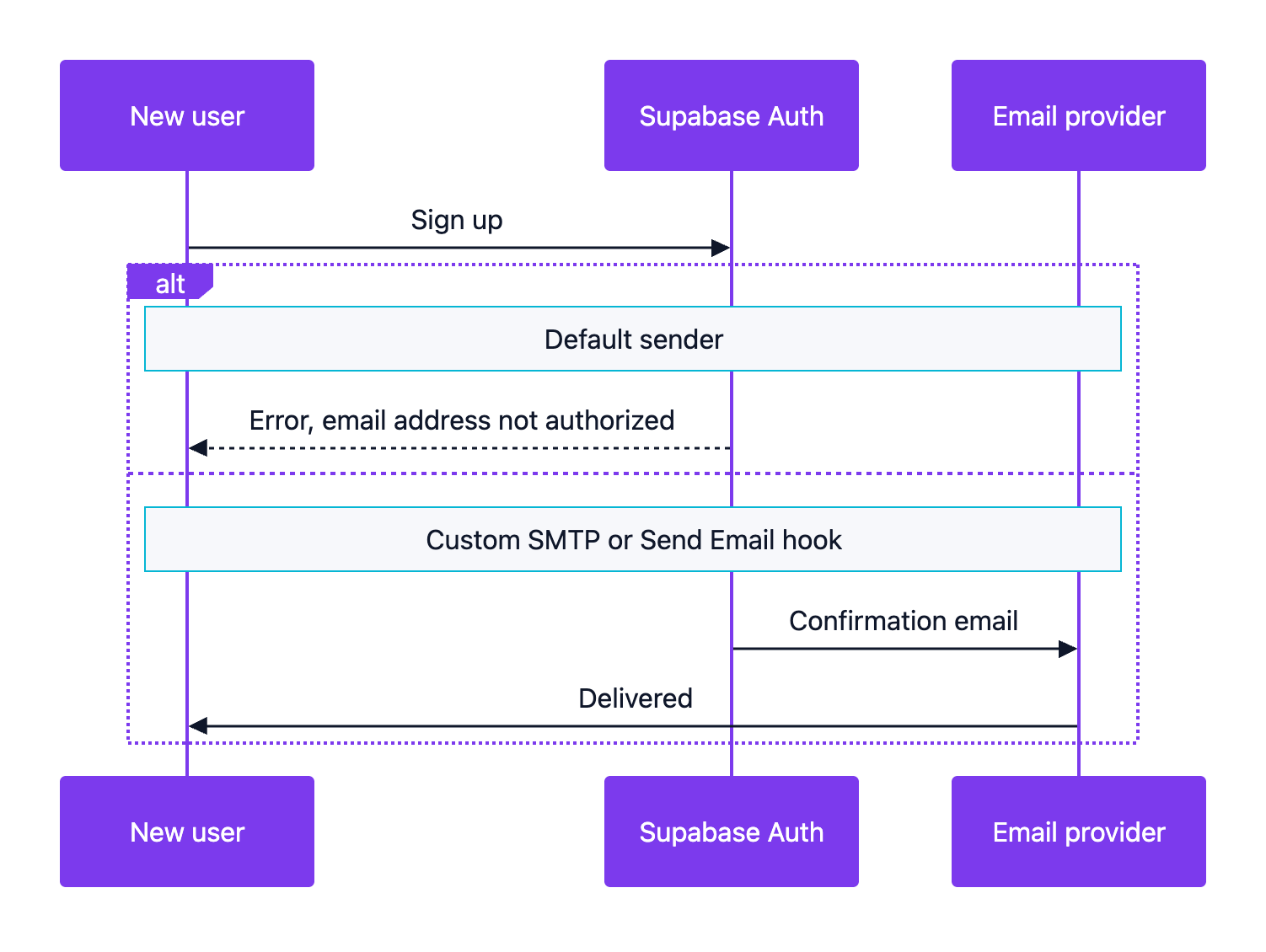
- It only sends to members of your Supabase project team. Everyone else gets an “Email address not authorized” error.
- It is capped at 2 messages per hour.
- It is best effort, with no SLA for delivery or uptime.
- Supabase says it is for non-production use, such as testing templates with your team.
So sign-up works for the founder and fails for the first real user.
Sign-up email with the default sender and with your own provider:
Other platforms have their own defaults:
| Platform | Default behavior | What to change before launch |
|---|---|---|
| Supabase (your own project) | Team-only recipients and 2 emails per hour | Add custom SMTP or a Send Email hook |
| Lovable Cloud | Free plans send auth emails from the default Lovable Cloud Auth sender | Set up custom emails on a paid plan |
| Amazon SES (new account) | Sandbox mode: verified recipients only, 200 messages per 24 hours, 1 per second | Request production access |
Lovable’s custom emails documentation says each paid workspace gets 50,000 transactional emails per month. Lovable sets up SPF, DKIM and DMARC with no outside provider account. Only transactional email is supported, so newsletters need a separate tool.
AWS Support first responds to a sandbox exit request within 24 hours, per its production access guide.
Resend vs Postmark vs Amazon SES vs SendGrid pricing
Supabase lists six SMTP options: Resend, AWS SES, Postmark, Twilio SendGrid, ZeptoMail and Brevo. The first four are the ones I see most in indie stacks, so this is mostly Resend vs Postmark vs Amazon SES.
| Provider | Free option | Entry paid plan | Extra volume | Best fit |
|---|---|---|---|---|
| Resend (pricing) | 3,000 emails a month, max 100 a day | Pro at $20/month for 50,000 emails | $0.90 per 1,000 on Pro, if pay-as-you-go is on | TypeScript and React apps that want the quickest setup |
| Postmark (pricing) | 100 emails a month, no overage | Basic at $15/month for 10,000 emails | $1.80 per 1,000 on Basic, $1.30 on Pro | Login, receipt and alert emails where speed matters |
| Amazon SES (pricing) | No fixed free quota; new AWS accounts get Free Tier credits | Pay as you go | $0.10 per 1,000 emails, plus $0.12 per GB of attachments | High volume and teams already on AWS |
| SendGrid (pricing) | 60-day trial with 100 emails a day | Essentials from $19.95/month | Depends on the volume tier | Teams already on Twilio, or mixed API and marketing email |
Illustrative calculation for an app that sends 20,000 emails a month. These are list prices before tax:
- Resend: the $20 Pro plan covers it.
- Postmark: Basic is $15 plus 10,000 × $1.80 per 1,000. That is about $33, unless a bigger tier costs less.
- Amazon SES: 20 × $0.10 = $2, plus attachment data.
- SendGrid: Essentials starts at $19.95. Check which tier covers 20,000 emails.
Below 50,000 emails a month, cost rarely decides it. Setup time and deliverability matter more.
Mailgun is another option worth comparing.
Which transactional email provider fits your app
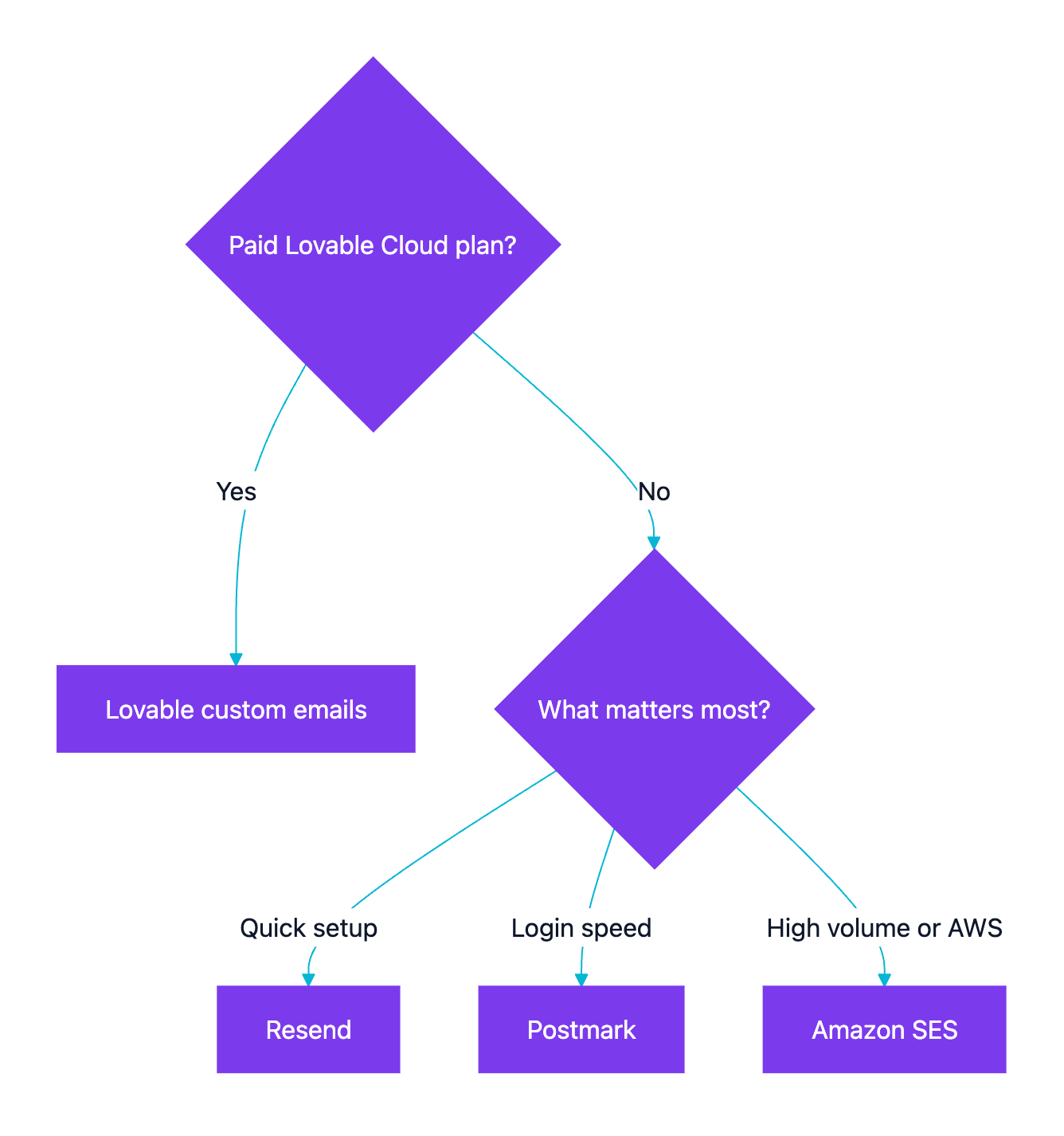
Apply these rules in order:
- Lovable Cloud on a paid plan: use Lovable’s built-in custom emails. One less vendor.
- Your own Supabase project with a TypeScript stack: use Resend. The SMTP setup is four fields. The free plan covers testing.
- Email login is the core of the product: use Postmark. Its Message Streams keep transactional and broadcast mail on separate sending infrastructure.
- More than about 100,000 emails a month, or already on AWS: use Amazon SES. Expect IAM setup, region-specific SMTP credentials and a sandbox review.
- Already on Twilio: SendGrid is a fair choice. Its free option is now a 60-day trial, not a permanent free plan.
Choosing a transactional email provider:
Watch Resend’s free daily cap. If a launch post brings 300 sign-ups in one day, about 200 get no confirmation email.
Editorial recommendation: for a new app on its own Supabase project, I start with Resend on a subdomain such as mail.yourapp.com. I switch to Postmark if login emails arrive late, and to SES once volume makes the bill matter.
How to set up Supabase custom SMTP
Most of the setup time goes to DNS verification.
- Add and verify your sending domain with the provider. It gives you the DNS records to add.
- Create an SMTP credential. That is a Resend API key, a Postmark Server API token or an SES SMTP user.
- Open the Auth SMTP settings in the Supabase dashboard and turn on custom SMTP.
- Enter the host, port, username and password. Then add the sender email and sender name.
- Raise the email rate limit. After you save, Supabase applies a low limit of 30 messages per hour. Change it on the Auth Rate Limits page.
- Test sign-up, magic link, password reset and email change with an address outside your team.
| Provider | Host | Port | Username | Password |
|---|---|---|---|---|
| Resend | smtp.resend.com |
465 | resend |
Your Resend API key |
| Postmark | smtp.postmarkapp.com |
587 | Server API token | Server API token |
| Amazon SES | email-smtp.<region>.amazonaws.com |
587 | SES SMTP username | SES SMTP password |
These values come from Resend’s Supabase guide, Postmark’s SMTP page and the SES SMTP credentials guide. SES SMTP credentials are unique to each AWS Region. The SMTP password is not your AWS secret access key.
To render emails in code or use a provider without SMTP, use the Supabase Send Email hook. It replaces built-in sending with an HTTP endpoint (such as an Edge Function) or a Postgres function. When the hook is on, SMTP is skipped.
Supabase’s rate limits page says you can change the email limit with custom SMTP or the hook. OTP and magic link requests for the same user also have a 60-second window.
Also check the Supabase Site URL and redirect URLs. Wrong values send confirmation links to localhost. The Lovable deployment guide covers those settings.
SPF, DKIM and DMARC for app email in plain terms
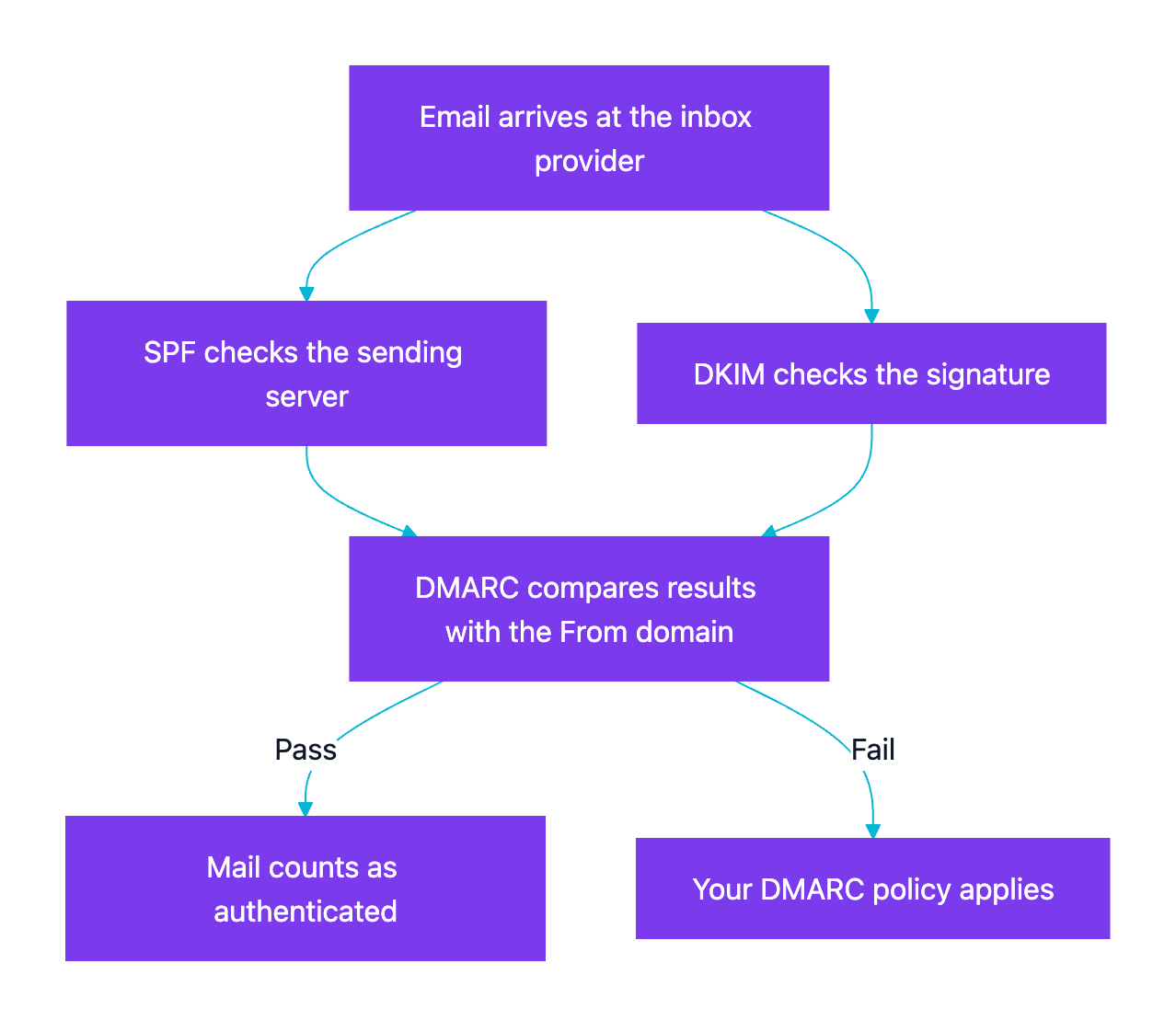
SPF, DKIM and DMARC are three DNS records. They tell inbox providers that your app may send mail for your domain.
| Record | What it proves | Typical setup |
|---|---|---|
| SPF | Which servers may send mail for the domain | One TXT record with the value your provider gives you |
| DKIM | The message was signed by your domain and not changed | One or more TXT or CNAME records from the provider |
| DMARC | What receivers should do when checks fail, and where to send reports | A TXT record at _dmarc.yourdomain.com that starts with p=none |
How an inbox provider checks your app email:
Gmail’s sender guidelines apply to all mail sent to Gmail accounts since February 2024:
- All senders need SPF or DKIM, valid forward and reverse DNS, and a TLS connection.
- All senders must keep the spam rate in Postmaster Tools below 0.3%.
- Bulk senders need SPF, DKIM and DMARC. Gmail defines them as about 5,000 or more messages a day to Gmail accounts.
- For bulk senders, the From domain must match the SPF or DKIM domain. Their marketing mail needs one-click unsubscribe.
A common mistake is a second SPF record for the new provider. RFC 7208 allows only one SPF record per domain. Merge the provider’s include into the existing record instead.
Editorial recommendation: add all three on day one, even far below the bulk threshold. It is a few DNS records and prevents a spam-folder surprise later.
Keep transactional and marketing email apart
Password resets and newsletters should not share a sending reputation. A spike of spam complaints after a promo can slow down login emails.
- Send product email from one subdomain, such as
mail.yourapp.com. Send marketing from another. - Use Postmark’s separate Message Streams if you send both through Postmark.
- Lovable custom emails allow only transactional mail.
- Resend sells marketing plans separately. They are priced by contacts, not by emails sent.
- Loops combines product and marketing email in one tool.
Replies and inbound email need a receiving setup
Everything above covers sending. When a user replies to a notification or writes to [email protected], the message goes to the From or Reply-To address. It lands wherever that domain’s MX records point, not in your app. Postmark, Mailgun, SendGrid and Amazon SES all offer inbound processing as a separate feature, with its own MX records and webhook. The guide to receiving inbound email in a Lovable or Supabase app compares the options and walks through an Edge Function setup.
Pre-launch transactional email checklist
| Check | How to verify | Why it matters |
|---|---|---|
| Custom SMTP or hook is active | Sign up with a Gmail address outside your team | The default sender rejects non-team addresses |
| Rate limit raised | The Auth Rate Limits page shows your value, not 30 per hour | Sign-ups past the limit get a rate-limit error |
| SPF, DKIM and DMARC pass | Open a received email in Gmail and choose Show original | Unauthenticated mail lands in spam or bounces |
| Links point to production | Click the confirm and reset links | A wrong Site URL sends users to localhost |
| Sender looks familiar | The From name and address use your brand domain | Users ignore or report unknown senders |
| Bounces and complaints handled | A provider dashboard or webhook is set up | SES asks you to confirm this for production access |
| Credentials stay server-side | No SMTP password or API key in frontend variables | Anyone can read VITE_ values in the browser bundle |
For the rest of your launch prep, use the app launch checklist. Still picking a backend? See the backend comparison for vibe-coded mobile apps and the Lovable, Supabase and Resend stack.
Bottom line
Do not launch a vibe-coded app on the Supabase default sender. It reaches only your team and sends 2 emails per hour.
On Lovable Cloud, use its built-in custom emails on a paid plan. On your own Supabase project, connect Resend for the fastest setup. Pick Postmark when login email speed matters most, or Amazon SES for the lowest cost at volume. Then raise the 30-per-hour limit, add SPF, DKIM and DMARC, and test every auth email with an outside address.